Guide
How to Deploy an App Without GitHub
Deploy an AI-built app without GitHub: paste one prompt into your AI tool and get a live HTTPS link. No repo, no Docker.
You don’t need GitHub to put your app online.
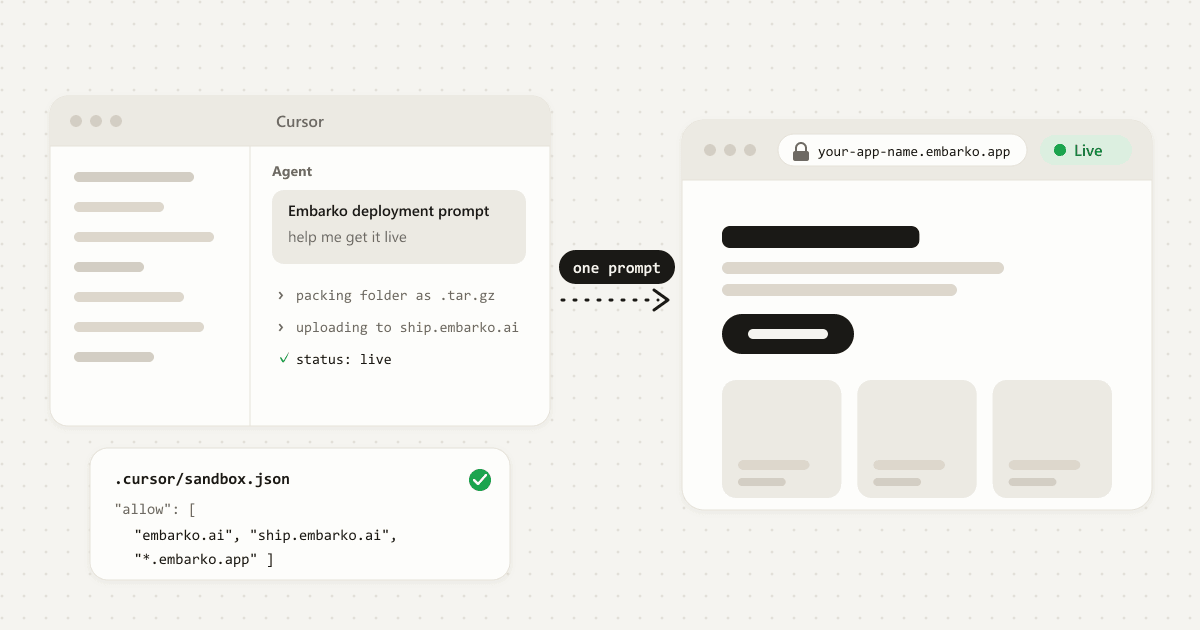
Copy the deployment prompt from embarko.ai, paste it into the AI tool that built your app, and the tool packs your project folder, uploads it and hands you a live HTTPS link like your-app-name. There’s no repository to create and no Docker to write, and your first link needs no account.
Key takeaways
- Many hosts build your app from a Git repository. That means a GitHub account, a few Git commands and a connection to set up before anything goes live.
- You can skip all of it. Your AI tool packs the project folder and uploads it to Embarko’s API directly.
- Your first link needs no account. Press Keep within 24 hours and it stays at the same address.
- Embarko isn’t where your code lives, so keep your own copy somewhere safe. A local Git repository is enough.
01 — The usual road
Why many hosts ask for a GitHub repo
Many hosting tools are built around a simple idea: your code lives in a Git repository, and the host watches that repository. Every time you push a change, the host builds your app again and puts the new version online.
That works well for teams and for projects you’ll keep changing for months. It also asks you to do several things first:
-
Make a GitHub account and create a repository.
-
Learn enough Git to push your code there and keep it up to date.
-
Sign up for a host and connect it to the repository.
-
Tell the host how to build and start your app, which can mean build commands, start commands and sometimes a Dockerfile.
None of that is hard for a developer. For a small app your AI tool wrote in one sitting, it’s a lot of setup between “it works” and “here’s the link”.
02 — The direct road
What “deploying without a repo” means
There’s nothing missing. The repository was only ever a way to get your files to the host. You can send them directly instead:
- Pack. Your project folder becomes one compressed archive, a
.tar.gzfile. - Upload. The archive goes straight to the host, with no repository in between.
- Build. The host works out the language from your files and builds the app.
- Serve. The app goes live at a public address.
- app/
- package.json
- server.js
- src/
- node_modules/
- .git/
- .env
- Dockerfile
Change the folder, then deploy it:
Embarko works this way, and your AI tool does every step for you.
03 — Side by side
The usual route compared with Embarko
| The usual route | With Embarko |
|---|---|
| Create a GitHub account and push a repository | No repository. Your tool uploads the project folder directly. |
| Sign up and learn a hosting dashboard | Your first link needs no account. |
| Set build commands and write a Dockerfile | No Dockerfile. Embarko detects the language and builds the app itself. |
| Watch the build and decode the logs | Your tool checks the status and gives you the link. |
| Learn the hosting terms first | Paste one prompt, then approve and keep. |
Not sure your app fits? What you can deploy is in the FAQ, with what to do if yours needs something else.
04 — Four steps
Step by step: from folder to live link
Four steps. Tap a number when you’ve done it. 0 of 4 done.
Before you start
- Your project is open in your AI tool.
- The tool can run commands and reach the internet. It asks before it does.
-
Copy the deployment prompt
Open embarko.ai and copy the deployment prompt, or copy it right here. It’s a ready-made message that tells your AI tool how to deploy, so you don’t have to learn the API.
deployment-prompt.txt What this does: tells your AI tool how to pack, upload and check your app, with no repo and no Dockerfile.Deploy this app to Embarko — cloud hosting for small apps. No Dockerfile, no signup. Read https://embarko.ai/docs/quickstart.md and follow it. Nothing to install. Deploy anonymously first — no token, no account — then give me the live URL. Only once it's live, ask me for my email: Embarko mails back a token that makes the app permanent. Faster, if your tools let you install one: npx skills add embarko-ai/skill --skill embarko-deploy -g
-
Paste it into your AI tool, inside your project
Open your project in Claude Code, Cursor, Codex or another AI tool and paste the prompt. Which one are you using?
Cursor, Codex or another AI tool
- Open your project folder in the tool.
- Paste the deployment prompt into its chat and send it.
- It packs the folder, uploads it and gives you a live link.
Using Claude Code?
You can install the open Embarko skill once, then simply ask your tool to deploy.
Using Claude in the browser or desktop app?
Add the Embarko connector (how to connect). Apps it deploys are saved to your account from the start, so there’s nothing to keep. It deploys from a public
.tar.gzlink, not from a folder on your computer.Here’s an example of what to ask:
Deploy my portfolio to Embarko and share the live link -
Let your tool do the deploy
It packs the project (leaving out
node_modules,.gitand.envfiles), uploads it, and checks the status about every 10 seconds until the app islive. A static site is usually live straight away.- A first reply of “202 Accepted” only means the build has started. The app is live when the status says
live. See 202 Accepted is not live. - If your tool says it can’t reach Embarko, see if something goes wrong below.
- A first reply of “202 Accepted” only means the build has started. The app is live when the status says
-
Open your link and keep it
Open the address your tool gives you and click around. A link made without signing in lasts 24 hours with no reminder email, so press Keep on the “keep this app” link your tool shares (or ask it to make the app permanent) and it stays at the same address.
your-app-name.embarko.app
Made without signing in. No reminder email.
Scroll, and watch the 24 hours run down. Press Keep before they do.
~/my-app/your-app-name.embarko.appOnly you can open it
Finish the four steps and your folder gets a live link.
Stuck at any step? Failed deploys often come down to the port, a missing setting or the main file not being at the top of the folder.
Open the fix list05 — Later
Changing the app later
Ask your tool to redeploy with the same app name. Embarko keeps deployment history, and you can roll back to a recent successful build.
Redeploy my app to Embarko with the same app name.
Since your project folder is the only copy of your code, keep your own source history too. A local Git repository, a copy in cloud storage or a regular backup of the folder all work, and none of them need GitHub.
- A local Git repository
- A copy in cloud storage
- A regular backup of the folder
06 — Questions
FAQ
What does it mean to deploy without GitHub?
It means sending your project files straight to the host instead of going through a Git repository. Your AI tool packs the folder into an archive and uploads it, the host builds it, and the app goes live at a public address. GitHub is one way to get files to a host, not a requirement.
Do I need Git at all?
No. Embarko doesn’t need a Git repository, and your tool uploads the folder directly. See the agent quickstart.
What can I deploy without GitHub?
Embarko suits small web apps: plain websites, Node.js apps, Python apps, React or Vite apps and small SQLite databases. A frontend and a backend in one project are two apps. Postgres or MySQL, live WebSocket updates, scheduled jobs and your own AI model need another route. Here’s how common AI-built apps line up, and what to do if yours needs something else.
| What your AI built | Fits? | What to know |
|---|---|---|
| A plain website | Yes | Keep index.html at the top of the folder. Usually live straight away. |
| A Node.js app | Yes | package.json at the top. Read the port from PORT and listen on 0.0.0.0. |
| A Python app | Yes | requirements.txt or pyproject.toml at the top. |
| A React or Vite app | Yes | Built first, then run as a server app. |
| A small database | Yes, SQLite | Save the file under DATA_DIR, the folder that survives redeploys. Keep your own copy of important data. |
| A frontend and a backend in one project | Two apps | One deploy is one app. Deploy each folder as its own app. |
| Postgres or MySQL | Another route | Embarko has no managed database. Use SQLite for small data, or host that app where its database lives. |
| Live updates (WebSockets) | Another route | Use regular HTTP polling instead. |
| Scheduled jobs | Another route | Run them elsewhere and have them call your app. |
| Your own AI model, or heavy processing | Another route | Host the model, or run the heavy job, elsewhere and let your app call it. Apps get 256MB of memory and no GPU. |
Embarko also detects Go, Ruby, PHP, Rust and Java. Each app runs as one process with 256MB of memory, which can’t be raised.
Delete any Dockerfile your AI tool added. Embarko builds the app itself and rejects an upload that includes one.
Do I need an account?
Not for the first deploy. You can deploy anonymously and press Keep within 24 hours to make the link permanent. Keeping an app needs only an email address.
Will my .env file be uploaded?
No. Your tool leaves .env files out of the archive. Keep secret keys out of your project files and, once you’ve pressed Keep, ask your tool to add them as environment variables. Embarko stores them encrypted and nobody can read them back. Environment variables work on server apps only, because static sites have no process to read them. After setting one, apply it or redeploy. Your tool can follow how to add a secret.
Is it safe to put my app online without a repo?
The archive leaves out .env files, and secrets are stored encrypted and can’t be read back. Also remember that anyone with your link can open your app, so if it uses your AI key, set a spending limit with your AI provider if they offer one.
What can I name my app?
Use lowercase letters, digits and dashes, 3 to 63 characters, not starting or ending with a dash. The name becomes your subdomain and must be unique across all of Embarko, so your tool picks another if it’s taken. See app names.
Is it free?
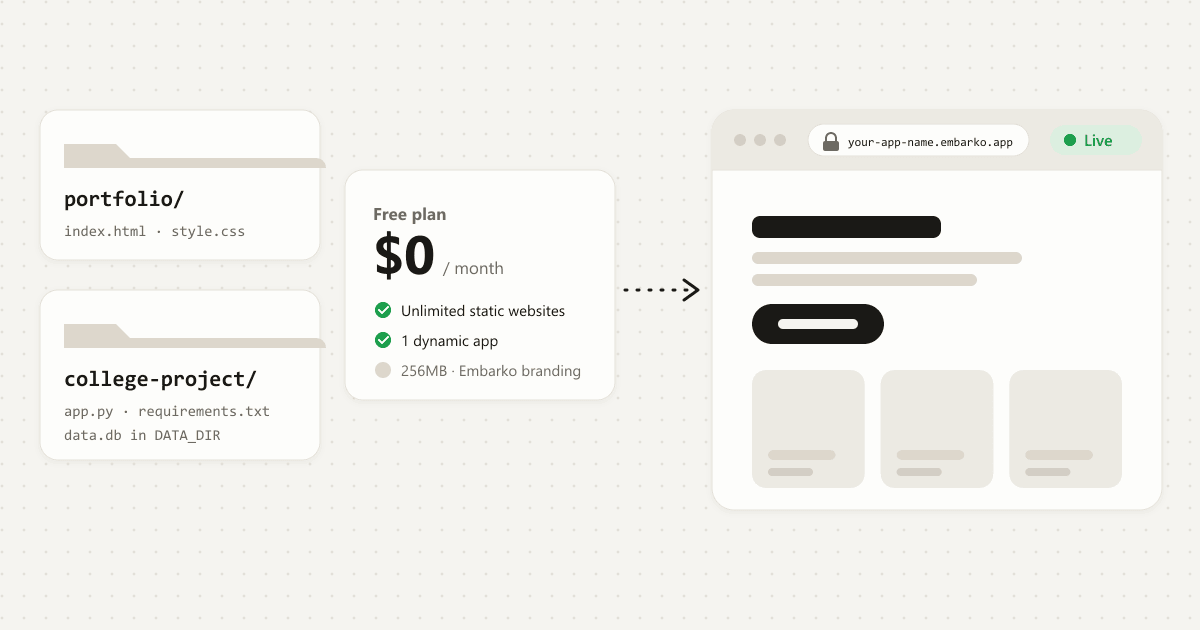
There’s a Free plan with 1 dynamic app and unlimited static websites. Creator is $9/month billed yearly for up to 5 dynamic apps, and Team is $23/month billed yearly for up to 20. See pricing.
Can I use my own domain?
Custom domains are supported, and the pricing page lists custom domain support on the Creator plan. You need to own the domain. Your tool registers it and you add the one DNS record it names. If it doesn’t start working, see custom domain troubleshooting.
Which AI tools can I use?
Embarko’s site names Claude Code, Cursor, Codex, Bolt, Lovable, v0, Replit and GPT, and says any AI tool works. Claude has a dedicated connector. Other tools use the copied prompt (tool not listed?). Browser-based tools may need embarko.ai, ship.embarko.ai and *.embarko.app allowed in their network settings.
A folder only you can open
Your turn
Built something with AI? Ask it to deploy to Embarko.
Copy the prompt, paste it into your AI tool and get a live link without creating a repo.
- Copy
- Paste into your AI tool
- Share your link
Keep reading: How to deploy an AI app · Troubleshooting reference · Agent quickstart · Docs · Pricing