Guide
Free hosting for students: put your project online for $0
Put a portfolio, college project or hackathon demo online for $0 with your AI agent.
localhost:3000, which only you can open. On the Free plan your AI agent puts it online for $0, at a link a teacher, a recruiter or a hackathon judge can open.Students can host a project for free on Embarko’s Free plan.
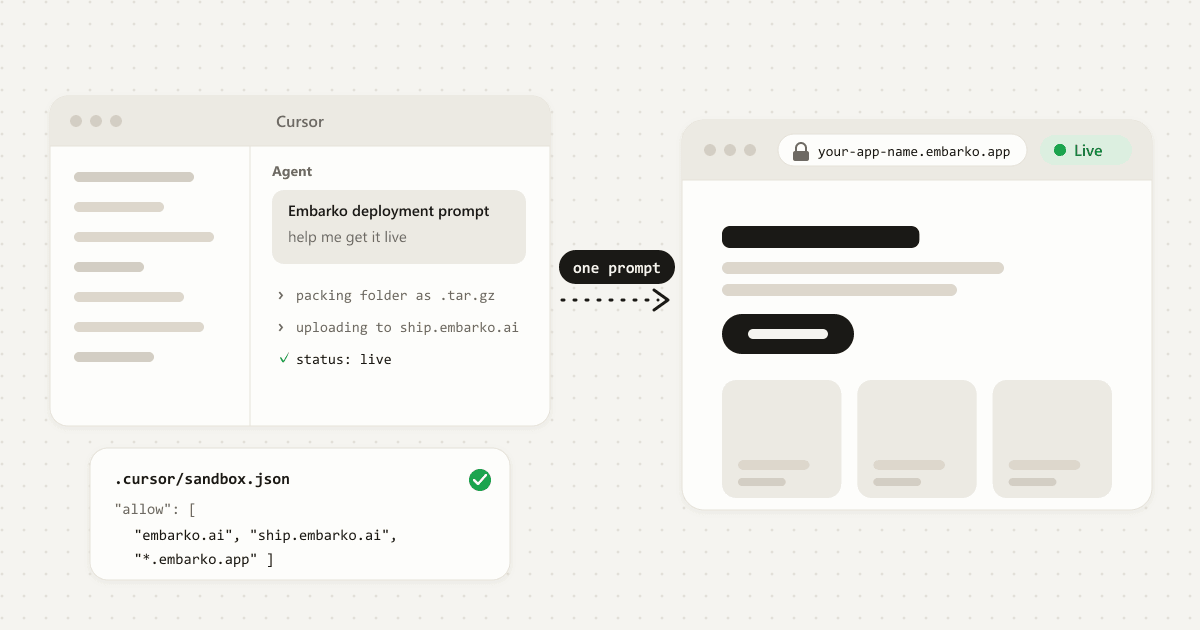
It lists unlimited static websites and 1 dynamic app. You build with an AI tool, paste Embarko’s deployment prompt into it, and the agent uploads the project and returns a live link at your-app-name. Press Keep within 24 hours so the project stays online. There’s no GitHub repo and no Dockerfile to deal with.
Key takeaways
- Hosting means putting your project on a server with a public address. Free options differ in what they run: plain files, small apps or a whole machine.
- The Free plan is $0 a month. It lists unlimited static websites and 1 dynamic app, and Embarko branding stays on. Prices are from embarko.ai/pricing and can change.
- It’s the same Free plan for everyone. The pricing page lists no student verification and no separate student plan.
- Your AI agent does the deploy. Paste the deployment prompt from embarko.ai into the tool that built your project.
- Your first link needs no account. Press Keep within 24 hours, and do it before your demo or submission.
01 — From your laptop
What “free hosting” means for a student project
A project on your laptop runs at an address like localhost:3000, which only you can open. To show it to a teacher, a recruiter or a hackathon judge, it needs hosting: a server that stays on, your project’s files copied onto it, and a public address anyone can open.
Student projects usually fall into three groups, and each needs something different from a host:
02 — What the host runs
Three kinds of free hosting
“Free hosting” covers different things, so it helps to know which one you’re looking for:
| Kind | What it gives you | Good for |
|---|---|---|
| Static site hosting | Serves plain files. No server code runs. | A portfolio or a page of HTML, CSS and JavaScript. |
| App hosting | Runs your code and serves the result. You upload the app and the platform runs it. | A college project with a backend, or a small AI app. |
| A free server or VPS | A machine you log into and manage yourself. | Projects that need a machine you can configure. |
Embarko is app hosting that also publishes plain-file static sites, and your AI tool does the upload.
03 — The usual road
Why free hosting gets complicated
Free options can ask for more than you may expect:
- A GitHub account and a repository, plus enough Git to push your project.
- A host to sign up for and connect, each with its own dashboard and vocabulary.
- Build and start settings, and sometimes a Dockerfile your AI tool didn’t write.
- A server to manage, if you pick a free VPS, including installing and updating things yourself.
- Secret keys kept out of your code and added as environment variables on the host.
That’s fair work for a developer. For a project you built with an AI tool the night before a deadline, it’s a lot between “it runs” and “here’s the link”.
04 — Side by side
The usual route compared with Embarko
| The usual route | With Embarko |
|---|---|
| Push the project to a GitHub repository | No repository. Your agent uploads the folder directly. |
| Sign up for a host and connect it | Your first link needs no account. |
| Configure the build, maybe add a Dockerfile | No Dockerfile. Embarko detects the language and builds the app itself. |
| Install and manage a server | You never log in to a server. Embarko runs the app. |
05 — The Free plan
What the Free plan gives you
Your projects
Drag a project onto the plan, or tap it. Tap it again to take it off.
$0Free plana month
Static websitesunlimited
Dynamic app1
- your-app-name.embarko.app
- Embarko branding: on
- 256MB per app
- Own domain: Creator plan
| On the Free plan | What it means |
|---|---|
| Unlimited static websites | Plain files (HTML, CSS, JavaScript) are static websites. |
| 1 dynamic app | Anything that runs a server, such as Express, Flask or FastAPI, counts as your one dynamic app. |
| Your own Embarko link | Your address is your-app-name.embarko.app. |
| Embarko branding | It stays on. |
Using your own domain is listed under the paid Creator plan, not Free. On every plan, an app gets 256MB of memory, which can’t be raised.
Not sure your project fits? What can a student host for free? is in the FAQ, with every kind of project and what to know.
06 — No server to manage
Is this a free VPS or a free server?
No. A VPS gives you a machine to manage. Embarko gives you hosting: your agent uploads the app, Embarko detects the language and builds it, runs it as one process and serves it over HTTPS. You don’t install or patch a server. If you need a machine you can configure, background workers or arbitrary ports, a VPS is the right tool for that part.
07 — Five steps
How to deploy a student project for free, step by step
Five steps. Tap a number when you’ve done it. 0 of 5 done.
Before you start
- Your project runs on your computer.
- Your AI agent can run commands and reach the internet.
-
Build the project with your AI tool and run it locally
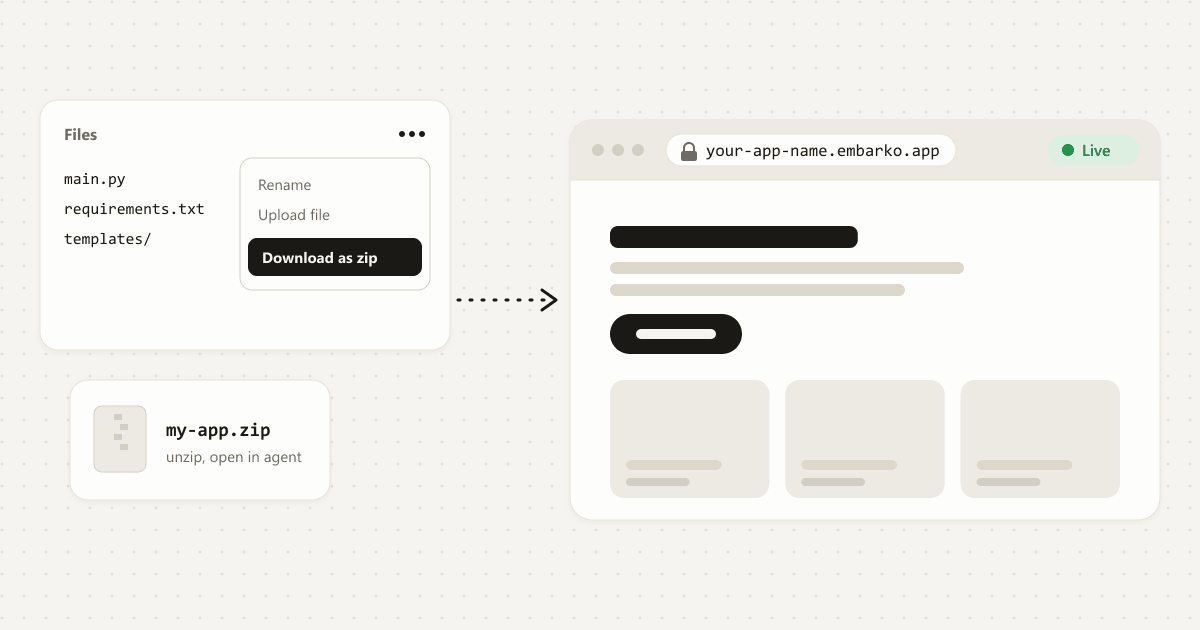
Use the tool you already work in. Open the project folder and make sure it runs on your computer. That folder is what gets uploaded. Built it in a browser-based tool? Paste the prompt there, and if that tool can’t reach Embarko (see step 4), download the code to your computer and deploy it from there.
-
Copy the deployment prompt
Open embarko.ai and click the button that copies the prompt (Host your app on the home page, Copy deployment prompt on pricing), then paste it into your AI agent.
Or copy it right here:
deployment-prompt.txt What this does: tells your AI agent how to upload your project and get its live link.Deploy this app to Embarko — cloud hosting for small apps. No Dockerfile, no signup. Read https://embarko.ai/docs/quickstart.md and follow it. Nothing to install. Deploy anonymously first — no token, no account — then give me the live URL. Only once it's live, ask me for my email: Embarko mails back a token that makes the app permanent. Faster, if your tools let you install one: npx skills add embarko-ai/skill --skill embarko-deploy -g
Add one line:
I built a project for college, help me get it live on Embarko -
Choose how to sign in
The agent may ask how you want to sign in. Pick token by email: give your email and paste the token from your inbox. Or sign in at embarko.ai/app/tokens, create a token and paste it to your agent.
If you use Claude, you can add the Embarko connector. Claude is the only AI tool that has one. Apps it deploys go straight into your account, so there’s nothing to keep later. It deploys from a public
.tar.gzlink (a compressed archive of your code that anyone can download), not from a folder on your computer, so for a project on your laptop the token by email is usually simpler. If you skip signing in, the project still goes live for 24 hours. Authentication: three ways in explains each option.How will you sign in?
Pick one to see what happens to your project.
-
Wait until the status says live
The agent packs the folder, uploads it and checks the status about every 10 seconds. A static site is usually live in the first reply, and a server app builds first. A first reply of “202 Accepted” only means the build has started, so wait for
live. See 202 Accepted is not live. When it sayslive, your agent gives you the link, for examplehttps://your-app-name.embarko.app. Open it to check.your AI agentIf the upload fails with a network error or
403 host_not_allowed, your tool’s sandbox is blocking Embarko and nothing was deployed. Allowembarko.ai,ship.embarko.aiand*.embarko.appin your tool’s network settings, or ask your agent for a deploy script and run it in your computer’s own terminal. See what to do when the API is unreachable. -
Keep it, and keep a copy
If you signed in with a token or the connector in step 3, your project is already kept. Otherwise, a link made without signing in lasts 24 hours with no reminder email, so open the claim link your agent gave you, sign in or sign up, pick a workspace and press Keep. If you’ve lost it, ask your agent to make it permanent with a token. The address doesn’t change, and the page you land on after pressing Keep gives you a prompt that carries a token, so paste it to your agent once to update the app later. Then keep your own copy of the code, for example a local Git repository.
Kept: on demo day, Friday, the link opens at the same address.
Deployed on Monday without signing in. Drag the demo-day flag, and press Keep.
localhost:3000your-app-name.embarko.appOnly you can open it
Finish the five steps and your project gets a free live link.
Stuck at any step? Pick what you’re seeing and get the likely cause and the fix.
Open the fix list08 — Before demo day
Hosting a hackathon or college project demo
Before demo day or submission:
- Make sure the project is in your account. An unkept app disappears 24 hours after its first deploy, with no reminder email.
- Open the live link on another device. If it loads there, other people can open it too.
- Add API keys as environment variables, after pressing Keep. Ask your agent to set each key and apply it. A write alone doesn’t reach the running app. Never leave keys in your code, because the agent leaves
.envfiles out of the upload. Static sites can’t have environment variables. - List it on Showcase if you want people to find it. A kept app can be added to the public Showcase gallery with a tagline and your name. See listing on Showcase. On your event’s own Showcase page, it appears once the organiser approves it, or straight away if the organiser gave you the page’s code. Hackathon organisers can apply for an event page.
Ask your agent
09 — Questions
FAQ
What is free hosting?
Hosting means putting your project on a server that stays online and giving it a public address. Free hosting is a plan that does this for $0, usually with some limits. Plain files, small apps and whole servers are different kinds, so check which one your project needs.
Is Embarko really free for students?
Yes, within the Free plan: $0 a month for unlimited static websites and 1 dynamic app, with Embarko branding. Paid plans exist (Creator is $9/month billed yearly, Team $23/month billed yearly), and all prices can change, so check embarko.ai/pricing.
Do I need to prove I’m a student?
The pricing page lists no student verification, and the Free plan is the same for everyone. You do need to sign in or sign up to keep your project: without a token it’s deleted after 24 hours, unless you keep it with the claim link from your agent’s first reply or with a token sent to your email.
What can a student host for free?
Embarko hosts small request-and-response apps: one process, 256MB of memory. A portfolio, a mini project in Node.js or Python, a React or Vite project and a project with a small SQLite database all fit. A project that needs MySQL, Postgres or MongoDB, live updates over WebSockets, a bot or job on a schedule, or machine learning that needs a GPU or more than 256MB needs another route. Find your project in this table.
| Your project | Fits? | What to know |
|---|---|---|
| Portfolio or personal website (HTML, CSS, JavaScript) | Yes | Published as static files, usually live in the first reply. Listed as unlimited on Free. |
| Mini project in Node.js (Express) or Python (Flask, FastAPI) | Yes | The manifest (package.json, requirements.txt or pyproject.toml) goes at the top of the folder. It runs a server, so it uses your one dynamic app. |
| React or Vite project | Yes, as a server app | Uploaded as source, it needs a build step, so it runs as a server app and uses your one dynamic app. To keep that slot free, see the tip below. |
| Project with a small database | Yes, with SQLite | Keep a SQLite file under DATA_DIR, the folder that survives redeploys. Keep your own copy of important data. |
| Project that needs MySQL, Postgres or MongoDB | Another route | Embarko has no managed database. Use SQLite for small data, or keep that project where its database lives. |
| Chat app or game that needs live updates (WebSockets) | Another route | Use regular HTTP polling instead. |
| A bot or job that runs on a schedule | Another route | Scheduled jobs and workers aren’t available. Put the work behind an HTTP route that an outside scheduler calls. |
| Machine learning that needs a GPU or more than 256MB | Another route | Run that part elsewhere. There are no GPUs, and going over 256MB is an out-of-memory kill. |
Delete any Dockerfile your AI tool added. Embarko builds the app itself and rejects an upload that includes one.
Keep a React or Vite project static. Ask your agent to build it first and upload only the build output folder (dist in Vite). It’s published as a static site and doesn’t use your dynamic app. Test your page links after deploying, because Embarko’s docs don’t say whether client-side routes work on a static site.
Can I host a college project that uses MySQL or MongoDB?
Not directly. Embarko has no managed database, so there’s no MySQL, Postgres or MongoDB to connect to. A project with a small amount of data can use SQLite under DATA_DIR. A project that needs MySQL, Postgres or MongoDB should keep that part where its database lives.
Can I use my own domain on the Free plan?
No. The pricing page lists your own domain under Creator, not Free. On Free your address is your-app-name.embarko.app, and Embarko branding stays on. If you need your own domain for a submission, check the Creator plan on the pricing page before you start.
Will my project stay online after the demo?
Yes, if it’s in your account: deployed with a token or the Claude connector, or kept within 24 hours with your agent’s claim link or a token. Otherwise it’s deleted 24 hours after its first deploy. After you keep it the link stays the same. Keep your own copy of the code too.
Is there a free VPS for students?
Embarko isn’t a VPS. Your agent uploads the app, Embarko builds it and serves it over HTTPS, and each app runs as a single process with 256MB of memory. You never log in to a server. That suits small AI-built projects, but not background workers or a machine you configure yourself.
Is it safe to host my student project online?
Keep secret keys out of your project files. The agent leaves .env files out of the archive, and once you’ve pressed Keep you can add keys as environment variables, which Embarko stores encrypted and nobody can read back. Also remember that anyone with your link can open your project, so if it uses your AI key, set a spending limit with your AI provider if they offer one.
Only you can open this
Your turn
Built something with AI? Ask it to deploy to Embarko.
Copy the prompt, paste it into your agent and get a live link for your project without creating a repo.
- Copy
- Paste into your agent
- Hand in your link
Keep reading: How to deploy an AI app · Deploy an app without GitHub · Deploy a Replit app for free · Agent quickstart · Hackathons · Pricing