Guide
How to deploy a Replit app for free
Download your Replit app as a zip, paste Embarko’s deployment prompt into your agent and get a live HTTPS link. No GitHub or Dockerfile needed.
Download it as a zip, then let your AI agent put it online.
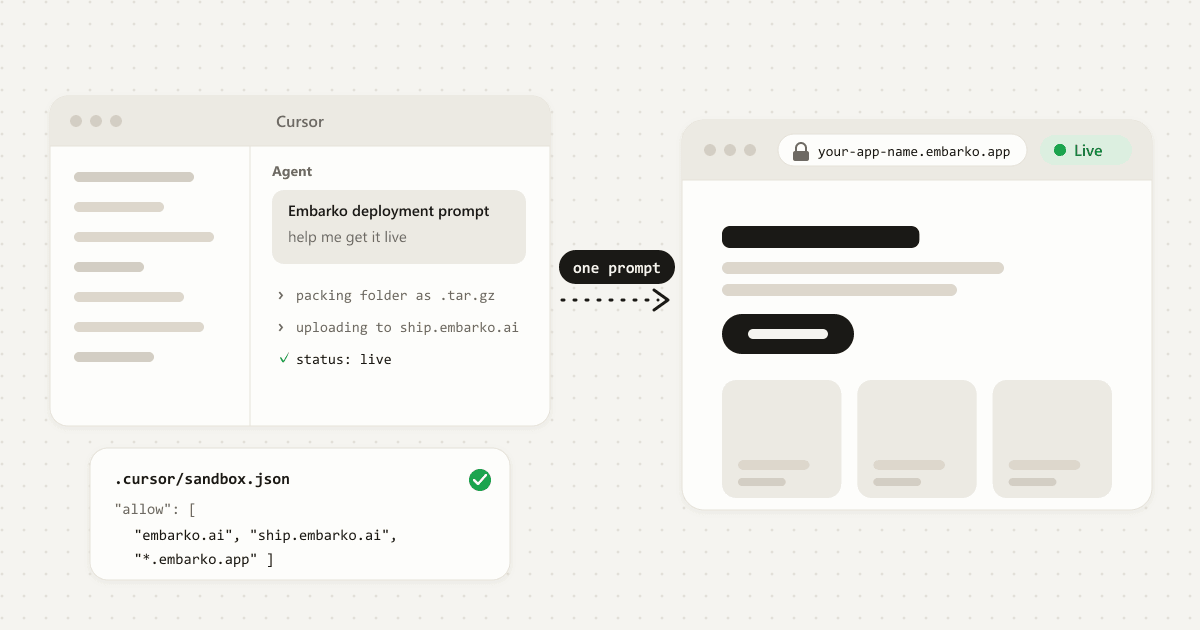
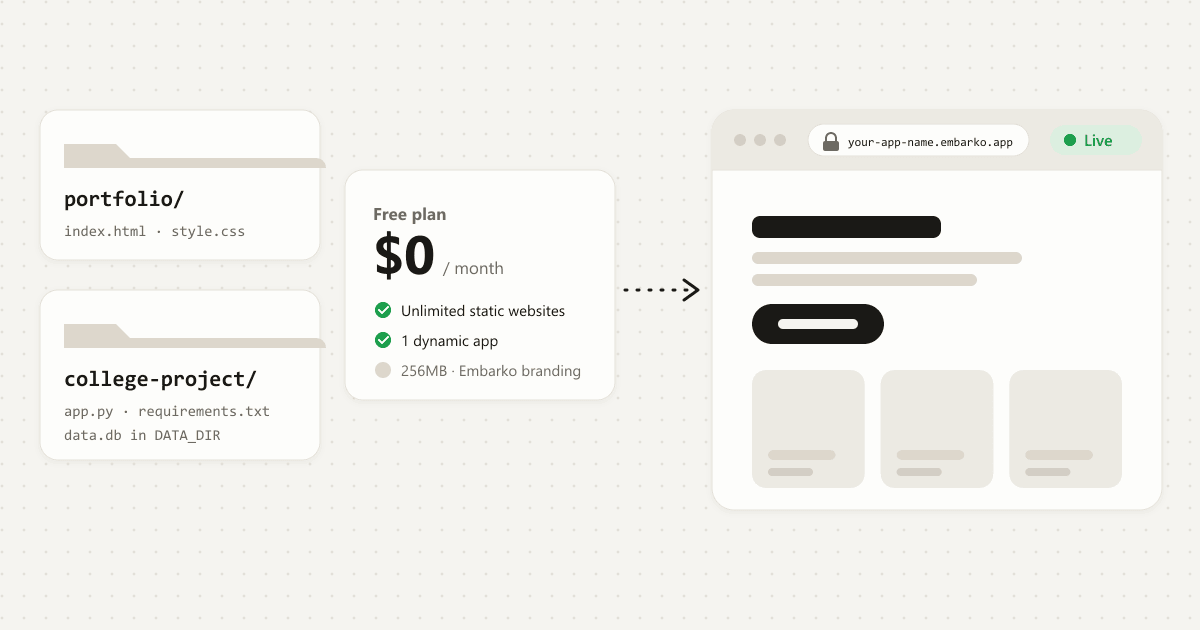
To deploy a Replit app for free, download it from Replit as a zip, open the folder in an AI agent that can run commands, and paste Embarko’s deployment prompt. The agent uploads the project and hands you a live HTTPS link at your-app-name. Embarko’s Free plan lists unlimited static websites and 1 dynamic app, and you press Keep within 24 hours so the link stays. Check that your app fits first.
Key takeaways
- A Replit app runs and lives inside Replit. To host it elsewhere you export it first. Replit’s help page says to select the three-dot menu at the top of the file tree and choose Download as zip.
- The usual route to a new host asks for a GitHub repository, a hosting account, build settings and secret keys.
- With Embarko, your AI agent packs the unzipped folder and uploads it from one prompt. No GitHub repo is needed.
- A zip holds files only. Replit’s own docs say secret values never leave the old project, the database isn’t copied and App Storage buckets don’t move, so all three have to be moved by hand. Here is how.
- The Free plan is $0, with Embarko branding. Your own domain is listed under Creator, not Free. Prices are from embarko.ai/pricing and can change.
01 — Moving out
Why a Replit app is hard to move
On Replit, building and hosting happen in one place. Replit runs your app, stores its files, keeps its database and holds its secrets. That’s why it’s so quick to start, and also why leaving takes a few deliberate steps.
Inside Replit
Nothing left to pack.
my-app.zip
Stays in Replit · move by hand
Hosting your app somewhere else is called deploying. It takes three things: a server that stays on, your app’s files copied onto it, and a public address anyone can open. Together that’s called hosting. Before any of that, your files have to leave Replit, which means exporting them.
02 — The usual road
Why deploying a Replit export gets complicated
Once you have the files, the usual route to a new host asks for more than you may expect:
A GitHub account and a repository, plus enough Git to push the export.
A hosting service. Vercel, Netlify and others each have their own sign-up, dashboard and vocabulary.
Build and start settings, and sometimes a Dockerfile Replit didn’t write.
Secret keys added again. Values you saved in Replit’s Secrets tool don’t travel with the zip.
Data that stays behind. A database you set up inside Replit and files in Replit’s App Storage are services, not files in the project.
Five jobs before the first link. Scroll, or tap a number.
That’s fair work for a developer. For a small app you built in Replit in one sitting, it’s a lot between “it works there” and “here’s the link”.
03 — Side by side
The usual route compared with Embarko
Embarko is hosting that your AI tool runs for you. Your agent packs the exported folder, uploads it and checks that it’s live.
| The usual route | With Embarko |
|---|---|
| Push the export to a GitHub repository | No repository. Your agent uploads the folder directly. |
| Sign up for a host and connect it | Your first link needs no account. |
| Configure the build, maybe add a Dockerfile | No Dockerfile. Embarko detects the language and builds the app itself. |
| Read the build logs yourself | The agent checks the status and hands you the link. |
Not sure your app fits? Will your Replit app fit on Embarko? is in the FAQ, with the table to check before you export.
04 — Five steps
How to deploy a Replit app to Embarko, step by step
Five steps. Tap a number when you’ve done it. 0 of 5 done.
Before you start
- You have a Replit project to export.
- You have an AI agent that can run commands in a folder on your computer, such as Claude Code or Cursor.
- Your app fits. Check it against the table before you export.
-
Download the project from Replit
In your Replit project, select the three-dot menu at the top of the file tree and choose Download as zip. If the download fails, open a Shell in Replit, run
zip -r project.zip ., and downloadproject.zipfrom the file tree (Replit’s own fallback).Files- main.py
- requirements.txt
- templates/
- static/
Your computer
- Downloads/
- my-app.zip
- my-app/
- requirements.txt manifest
- main.py
- templates/
Which folder do you open in your agent?
Open
my-app/: its manifest,requirements.txt, is at the top.zip -r project.zip .What success looks like: a
.zipon your computer. Unzip it and open the folder that holds your manifest (package.json,requirements.txt,pyproject.tomlorindex.html).Menu names are from Replit’s help page as of October 2026. Check that page if your workspace looks different.
-
Open the folder in an AI agent
Use any agent that can run terminal commands in your project folder. Embarko’s pages name Claude Code and Cursor, and say that if an AI tool built your app, Embarko can host it. Only Claude has an Embarko connector, and the connector deploys from a public
.tar.gzlink, so it can’t upload a folder from your laptop. For a Replit export, use the deployment prompt.It runs commands in your folder, so it can pack it and upload it. Use the deployment prompt.
-
Paste the deployment prompt
Open embarko.ai and click Host your app. It copies the deployment prompt. Paste it into the agent, then add one line:
deployment-prompt.txt What this does: tells your agent how to pack, upload and check your app, with no repo and no Dockerfile.Deploy this app to Embarko — cloud hosting for small apps. No Dockerfile, no signup. Read https://embarko.ai/docs/quickstart.md and follow it. Nothing to install. Deploy anonymously first — no token, no account — then give me the live URL. Only once it's live, ask me for my email: Embarko mails back a token that makes the app permanent. Faster, if your tools let you install one: npx skills add embarko-ai/skill --skill embarko-deploy -g
your agentI exported this from Replit, help me get it live on EmbarkoYour app is live: https://your-app-name.embarko.app. It stays online for 24 hours. Want me to keep it permanently?
Tell me your email. Embarko mails you a token, you paste it here, and the app becomes permanent at the same address.
The agent deploys first and asks later. Once the app is live, it gives you the link and offers to keep it. Say yes and give your email: Embarko mails you a token, you paste it back, and the app becomes permanent at the same address. Already have a token? Create one under Deploy tokens at embarko.ai/app/tokens and paste it instead. Using the Claude connector? Apps it deploys go straight into your account, so there is nothing to keep. If you say not now, the app still works for 24 hours. Keep a temporary app explains the steps.
-
Let the agent upload it
The agent packs the folder as a
.tar.gz, leaving outnode_modules,.gitand.envfiles. It then uploads the archive and checks the status about every 10 seconds until it readslive. A static site is usually live in the first reply, and a server app builds first.The app name becomes your address: lowercase letters, numbers and dashes, 3 to 63 characters, unique across all of Embarko. If it’s taken, the agent picks another.
.embarko.app- Lowercase letters, numbers and dashes
- 3 to 63 characters
- Unique across Embarko. If it’s taken, the agent picks another.
your agentlivepack my-app → my-app.tar.gz left out: node_modules/, .git/, .env upload 202 Accepted build started, not live yet status building · next check in about 10 s status live · https://your-app-name.embarko.app- A first reply of “202 Accepted” only means the build has started. See 202 Accepted is not live.
- If the upload fails with a network error or
403 host_not_allowed, your agent’s sandbox is blocking Embarko and nothing was deployed. See if something goes wrong.
-
Open your link and keep it
When the status is
live, the agent gives youyour-app-name. Open it and click around. If you used a token in step 3, the app is already in your account. Otherwise a link made without a token lasts 24 hours, so open the claim link your agent gave you and press Keep, or ask the agent to make it permanent with a token. The address doesn’t change. From then on your agent needs your deploy token to redeploy, and the page you land on after pressing Keep gives you a prompt that carries it. Paste that into your agent once..embarko.app your-app-name.embarko.app
Kept. The address doesn’t change.
Your redeploy prompt
It carries your deploy token. Paste it into your agent once.
Kept: the same address, and a prompt that lets your agent redeploy.
my-app · in Replityour-app-name.embarko.appStill inside Replit
Finish the five steps and your Replit app gets its own live link.
Stuck at any step? Failed deploys often come down to a blocked upload, a missing key or setting, or an app listening on the wrong port.
Open the fix list05 — What the zip left behind
Move your data and secrets by hand
If your Replit app kept data in Replit’s database, that data isn’t in the zip. Export it before you leave:
- In Replit’s Shell, follow Replit’s guide. It runs
pg_dumpagainst$DATABASE_URL, which exports the development database. - Your published app’s live data is usually in the production database. Copy its connection string from the Database tool’s settings and put it in the command in place of
$DATABASE_URL. - The command writes a file called
backup.dump. Download it, then delete it from the Replit file tree before you download the project zip (step 1). - Keep the dump outside the folder you upload (anything in the archive ships with the app) and give it to your agent to read and convert.
Which database holds the data you want?
Replit file tree
- main.py
- requirements.txt
- backup.dump
Your computer
- backups/backup.dump outside the upload
- my-app.zip files only, no dump
Also move these by hand:
- Load the data. Ask your agent how to load the exported rows into a SQLite file under
DATA_DIR. That folder exists only on the running app, so the agent needs a one-time import that runs inside the app, and any data file it ships in the upload holds real user data too.DATA_DIRsurvives redeploys, so keep your own copy of important data. Large or busy databases are a sign the app should stay where its database lives. - Secrets. Once you’ve pressed Keep, add each API key as an environment variable: write the value, then apply it. A write alone doesn’t reach the running app. Static sites can’t have environment variables.
Environment variables
API_KEY••••••••••
Your running app reads
API_KEYset
Written, then applied: now the running app has it.
- Logins and uploaded files. Replit’s docs say App Storage buckets don’t move with a project, and Replit Auth is Replit’s own sign-in. If your app uses either, ask your agent to build the app’s own sign-in and to store uploads under
DATA_DIR.
Since Embarko isn’t where your code lives, keep your own copy too. Keep the zip, or put the folder in a local Git repository.
06 — Questions
FAQ
What does it mean to deploy a Replit app outside Replit?
It means taking your app’s files out of Replit and putting them on a host of your own choosing, so it gets a public address that no longer depends on Replit. You export the project as a zip, and a host runs it. Data, secrets and logins that lived inside Replit have to be moved too.
Can I deploy a Replit app for free?
Yes, if it fits. Download the project as a zip from Replit, open the folder in an AI agent and paste Embarko’s deployment prompt. Embarko’s Free plan lists unlimited static websites and 1 dynamic app for $0 a month, with Embarko branding. Plans can change, so check embarko.ai/pricing.
Will your Replit app fit on Embarko?
Embarko hosts small request-and-response apps: one process, 256MB of memory and no GPU. Check your app against this table before you export.
Static sites, small Node.js and Python apps, and React or Vite apps with a build step fit. Apps that store data in a database set up inside Replit, live updates, scheduled jobs, background workers and heavy processing need another route, and Replit Auth or App Storage need swapping.
| Your Replit app | Fits? | What to know |
|---|---|---|
| Static site (HTML, CSS, JavaScript) | Yes | Published as files, usually live in the first reply. No logs and no environment variables. |
| Small Node.js app, such as Express | Yes | package.json at the top of the folder. Read the port from PORT and listen on 0.0.0.0. |
| Small Python app, such as Flask or FastAPI | Yes | requirements.txt or pyproject.toml at the top of the folder. |
| React or Vite app with a build step | Yes, as a server app | Built first, then run as a server app. On the Free plan, this is your one dynamic app. |
| App that stores data in a database set up inside Replit | Another route | Embarko has no managed database. A SQLite file under DATA_DIR is the built-in option. Export the data before you download the zip, then delete the dump from the project. |
| Uses Replit Auth or App Storage | Swap them | App Storage buckets don’t move with a project, and Replit Auth is Replit’s own sign-in. Embarko has no built-in login or object store, so ask your agent to build the app’s own sign-in and to keep uploaded files under DATA_DIR (download them from App Storage first). |
| Live updates (WebSockets) | Another route | Use regular HTTP polling instead. |
| Scheduled jobs or background workers | Another route | Run them elsewhere and have them call your app. |
| Heavy processing or more than 256MB | Another route | Run that part elsewhere. Going over 256MB is an out-of-memory kill, and the limit can’t be raised. |
Delete any Dockerfile in the export. Embarko builds the app itself and rejects an upload that includes one.
Do I need GitHub to move a Replit app?
No. Embarko takes the project folder directly: your agent packs it and uploads it, so there’s no repo to create or connect and no Dockerfile to write. Embarko isn’t where your code lives, so keep your own copy, such as the zip or a local Git repository, so you can redeploy an older version later.
Will my Replit database and secrets move over?
Not by themselves. A zip holds your files. Export a Replit database with pg_dump and load it into SQLite under DATA_DIR, and re-enter the values from Replit’s Secrets tool as environment variables once you’ve pressed Keep. Embarko has no managed database, so an app that needs Postgres or MySQL stays where its database lives.
Does Embarko have a Replit integration?
Embarko’s docs describe no Replit-specific integration. Only Claude has an Embarko connector, and it deploys from a public .tar.gz link, not from a folder on your computer. For a Replit export, use the deployment prompt in an agent that can run commands, or deploy with a token by email.
Will the app stay online?
Once you press Keep, yes. An app deployed without a token is deleted 24 hours after its first deploy, with no reminder email. Open the claim link in your agent’s deploy message and sign in, and it stays at the same address. No link? Ask your agent to make it permanent with a token. Apps deployed with a token are already in your account.
Is it safe to host my Replit app on Embarko?
Keep secret keys out of the folder you upload. The agent leaves .env files out of the archive, and Embarko stores environment variables encrypted so nobody can read them back. Also remember that anyone with your link can open the app, so if it uses your AI key, set a spending limit with your AI provider if they offer one.
Still inside Replit
Your turn
Built something with AI? Ask it to deploy to Embarko.
Export from Replit, paste the prompt into your agent and get a live link without creating a repo.
- Download as zip
- Paste into your agent
- Share your link
Keep reading: How to deploy an AI app · Deploy an app without GitHub · Deploy from Cursor · Quickstart · Troubleshooting reference · Replit help: projects and files · Pricing