Guide
How to Host a Website Built with Claude
Built a website with Claude? Ask Claude Code to deploy it and get a live HTTPS link, no GitHub or Vercel needed.
localhost:3000, where only your computer can open it. One ask in Claude Code takes it the rest of the way.To host a website built with Claude, ask Claude Code to deploy it.
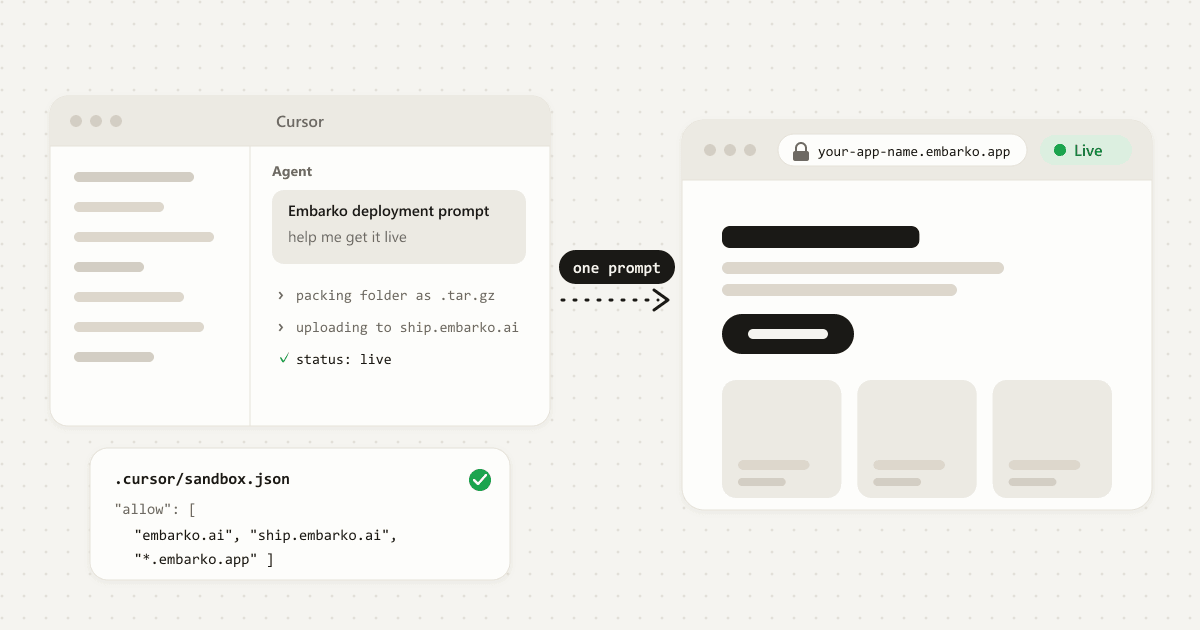
Install Embarko’s deploy skill or paste the deployment prompt from embarko.ai, and the agent packs your project folder, uploads it and hands you a live HTTPS link. A static site is usually live within seconds, and a server app builds first, so it takes longer. No GitHub or Vercel is needed.
Key takeaways
- A website Claude builds runs on
localhost, which only your own computer can open. To share it, it needs a host. - The usual route to a host asks for a GitHub repository, a hosting account, build settings and secret keys.
- You have two main routes with Embarko: the Claude connector (add it once, then ask Claude to deploy) or Claude Code (paste the deployment prompt or install the skill).
- With the connector, the site is permanent from the start. With Claude Code, the agent deploys first and asks for your email only after the site is live, then Embarko emails you a token to keep it.
- With Claude Code, your first link needs no account. Press Keep within 24 hours and it stays at the same address. Anyone with the link can open the site.
01 — Only on your computer
Why your Claude website isn’t online yet
When Claude builds a website, it runs it on your own machine so you can try it. You’ll often see an address like localhost:3000. “Localhost” simply means “this computer”, so a link that starts with it only works for you. Send it to a friend and it points at their computer, where your site doesn’t exist.
Putting a site online is called deploying. It takes three things: a server that stays on, your site’s files copied onto it, and a public address anyone can open. Together that’s called hosting. Claude builds the site, but something else still has to host it.
Hosting is three parts
02 — The usual road
Why hosting a Claude-built site gets complicated
Claude gives you a folder of code that works. The usual route to a host then asks for more than you may expect:
A GitHub account and a repository, plus enough Git to push the folder Claude made.
A hosting service. Vercel, Netlify and others each have their own sign-up, dashboard and vocabulary.
Build and start settings, and sometimes a Dockerfile Claude didn’t write.
Secret keys kept out of the code and added as environment variables on the host.
Build logs to read when a deploy fails, written for developers.
That’s fair work for a developer. For a small site Claude wrote in one sitting, it’s a long way from “it runs” to “here’s the link”.
03 — Side by side
The usual route compared with Embarko
Embarko is hosting that your AI tool runs for you. Claude packs or sends the site and checks that it’s live.
| The usual route | With Embarko |
|---|---|
| Push Claude’s folder to a GitHub repository | No repository. Claude sends the files directly. |
| Sign up for a host such as Vercel | With Claude Code, your first link needs no account. |
| Configure the build, maybe add a Dockerfile | No Dockerfile. Embarko detects the language and builds the site itself. |
| Read the build logs yourself | Claude checks the status and hands you the link. |
04 — Your starting point
Which Claude did you build it with?
“Built with Claude” can mean a few different setups, and each has its own route to a live link.
Where does your site live?
Claude Code: a project folder on your computer
- Best route
- The deploy skill or the copied prompt. The agent packs the folder and uploads it over HTTP.
- Good to know
- The first deploy needs no account and is temporary until you keep it.
Claude in a chat, with the Embarko connector
- Best route
- Add the Embarko connector once, then ask Claude to deploy. Claude sends your site’s files with
deploy_app. - Good to know
- No terminal and no token, and the site is permanent from the start. It works even where a sandbox blocks Embarko. A very large site may not fit in one call: use Claude Code or the upload page.
A Claude Artifact
window.storage?
- Best route
- Put the files in a project, then deploy with the connector or Claude Code.
- Good to know
- An artifact that calls
window.storageis rejected at deploy. Replace it with SQLite, with the file underDATA_DIR. That makes it a server app.
See them side by side
| Where your site lives | Best route | What to know |
|---|---|---|
| Claude Code: a project folder on your computer | The deploy skill or the copied prompt. The agent packs the folder and uploads it over HTTP. | The first deploy needs no account and is temporary until you keep it. |
| Claude in a chat, with the Embarko connector | Ask Claude to deploy. It calls the connector’s deploy_app tool with your site’s files. | No terminal, no token and nothing to keep. It works even where a sandbox blocks Embarko. |
| Claude in a chat, with no connector and no terminal | Add the connector once. If you can’t, ask Claude for a .zip of the site and use the upload page. | Nothing Claude does from inside the chat can reach Embarko until the connector is added. |
| A Claude Artifact | Put the files in a project, then deploy with the connector or Claude Code. | An artifact that calls window.storage is rejected at deploy. Replace it with SQLite under DATA_DIR. |
Is your site only in a Claude chat? Add the Embarko connector and ask Claude to deploy, as the next section shows. If you can’t add it, save the files into a project folder and use Claude Code, or ask Claude for a .zip and use the upload page.
05 — The connector route
How to host a website built with Claude with the connector
A connector lets Claude deploy and manage your apps from inside the chat, signed in as you. Claude is the only AI tool with an Embarko connector today. It needs no token, nothing to install, and it works where a sandbox blocks ship.embarko.ai. Only you can add it.
1. Add the connector once
Open claude.ai/directory/embarko, add Embarko and sign in. It’s the same sign-in as embarko.ai, so you’ll see the apps and workspaces you already have. If Claude says it can’t reach Embarko, it will give you this one link and ask you to connect first.
2. Ask Claude to deploy
With the connector added, ask Claude in plain words, for example:
Deploy my portfolio site to Embarko and send me the link
Claude calls deploy_app with your site’s files (text as it is, images and other binaries as base64), then calls read_app to check the status until the site is live. A plain static site is usually live straight away. You’ll get a link like your-site-name.
3. What the connector can do
| Tool | What it does |
|---|---|
deploy_app | Deploys or updates an app from its files. The app goes straight into your account: permanent, nothing to keep. |
read_app | Shows status, logs, details and analytics. |
update_app | Sets environment variables, connects your own domain, rolls back and sends feedback. |
app_danger_zone | Renames or deletes an app, only after you confirm. |
4. Know the limit
A connector call carries the whole site inside one tool call, so it’s limited by how much Claude can write in one reply, well before the 25MB cap. Send source files only: no node_modules, build output or videos. Images the site shows are fine, but very large media (over about 5MB each) should live on an outside host. There’s no way to split one deploy across several calls. If your site is too big, use Claude Code with the HTTP upload, or the upload page.
Or upload a zip
If Claude can’t reach Embarko and you can’t add the connector, there’s a route that needs no terminal. Ask Claude for the site as a .zip to download, then sign in at embarko.ai/app, choose Deploy an app and Upload file, and pick the folder or .zip. The browser packs it, the site goes into your account, and it’s permanent from the start.
06 — What Claude built
Is your site static or a server app?
This decides how it’s published and what it can do. Check what Claude built for you:
A folder with index.html and its CSS, JS and images
Published with no build and no server, usually live within 2 seconds.
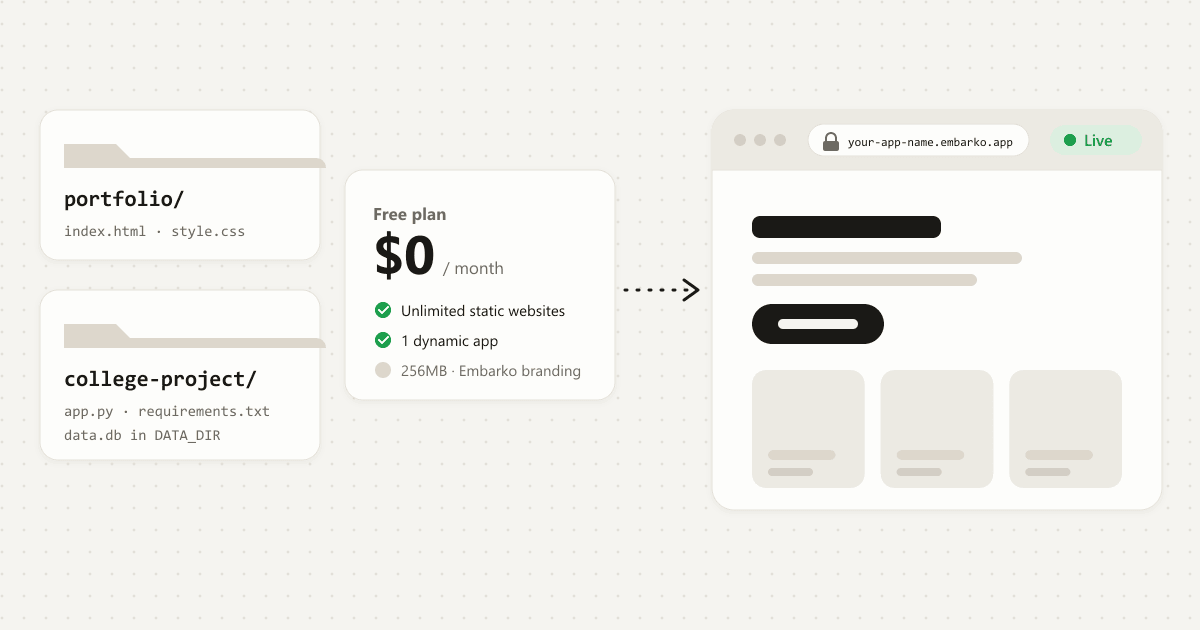
No logs, no environment variables and no DATA_DIR. A static site can’t later become a server app. The Free plan lists unlimited static websites (pricing).
A Vite, Create React App, Lovable or Bolt project
Built on Embarko, then served as a website.
Send the project with its package.json and build script, not a built dist folder. No start script or server is needed, and links to inner pages load the app.
Values the build reads, such as VITE_ ones, can’t come from .env. Put public values in a committed config file, and never put a secret key in frontend code.
A site with a Node or Python backend
Server app, one process.
It reads its port from PORT and listens on 0.0.0.0. Keep data in SQLite under DATA_DIR, which survives redeploys, and keep your own copy of important data. The Free plan lists 1 dynamic app (pricing).
See it as a table
| What Claude built | How Embarko treats it | What to know |
|---|---|---|
A folder with index.html and its CSS, JS and images | Static site. Published with no build and no server, usually live within 2 seconds. | No logs, no environment variables and no DATA_DIR. A static site can’t later become a server app. |
| A Vite, Create React App, Lovable or Bolt project | Built on Embarko, then served as a website. | Send the project with its package.json and build script, not a built dist folder. No start script or server is needed, and links to inner pages load the app. |
| A site with a Node or Python backend | Server app, one process. | It reads its port from PORT and listens on 0.0.0.0. Keep data under DATA_DIR, which survives redeploys. |
Needs Postgres, live updates, scheduled jobs, two apps in one project or a GPU? Here’s the route for each, in the FAQ.
07 — Four steps
How to host a website built with Claude, step by step
Four steps. Tap a number when you’ve done it. 0 of 4 done.
Before you start
- Your site runs locally.
- Claude Code can run commands and reach the internet. It may ask you to approve them.
-
Open the project in Claude Code
Start Claude Code in the folder that holds your site. That folder is what gets uploaded.
-
Give Claude the deploy instructions
Option A, the skill (faster)
Run this once in your terminal:
npx skills add embarko-ai/skill --skill embarko-deploy -gThis needs Node.js, because the command uses
npx. The skill packages and deploys for you, and its source is at embarko.ai/skill. Ifnpxisn’t found, install Node.js or use Option B, which needs nothing installed.Option B, the prompt
Open embarko.ai, copy the deployment prompt and paste it into Claude Code. It tells the agent how to deploy, so you don’t have to learn the API.
deployment-prompt.txt What this does: tells Claude Code how to pack, upload and check your site.Deploy this app to Embarko — cloud hosting for small apps. No Dockerfile, no signup. Read https://embarko.ai/docs/quickstart.md and follow it. Nothing to install. Deploy anonymously first — no token, no account — then give me the live URL. Only once it's live, ask me for my email: Embarko mails back a token that makes the app permanent. Faster, if your tools let you install one: npx skills add embarko-ai/skill --skill embarko-deploy -g
Option C, the Claude connector
Working in the Claude chat instead of Claude Code? Add Embarko to Claude once at claude.ai/directory/embarko and sign in, then ask Claude to deploy. It sends your site’s files with
deploy_app, needs no token, and the site is permanent from the start. See the connector section for the steps.Here’s an example of what to ask:
Deploy my portfolio to Embarko and share the live link -
Let Claude Code do the deploy
It packs the project (leaving out
node_modules,.gitand.envfiles), uploads it, and checks the status about every 10 seconds for a server app, or about every 2 seconds for a static site, until it reacheslive. A static site is usually live in the first reply, and a server app builds first, so it takes longer. It then opens the link itself to check the main feature works, and gives you the link and the exact time the site will be deleted if you don’t keep it. Claude Code may ask you to allow the commands.Claude Code · ~/my-portfoliolive- > Deploy my portfolio to Embarko and share the live link
- ● Packed my-portfolio left out: node_modules, .git, .env
- ● Uploaded · 202 Accepted build started, not live yet
- ● status: building 0:10
- ● status: building 0:20
- ✓ status: live · https://your-site-name.embarko.app
Allow Claude Code to run the upload command?
A server app builds first, so Claude Code checks the status until it says live.
- A first reply of “202 Accepted” only means the build has started. Only
livecounts. See Is it live? - If Claude Code says it can’t reach Embarko, see if something goes wrong below.
-
Open your link and keep it
Claude Code gives you the address,
your-site-name. Open it and click around to confirm it works. A site made without signing in lasts 24 hours with no reminder email, and the agent tells you the exact time it will be deleted. It offers to keep the site once it’s live: say yes and give your email, then Embarko emails you a token, you paste it back, and the agent redeploys the same name with it. The link stays the same, and the reply says claimed. How keeping works..embarko.app Click around: Projects, About and Contact. Then keep it.
localhost:3000your-site-name.embarko.appOnly you can open it
Finish the four steps and your site gets a live link.
Stuck at any step? Failed deploys often come down to the port, a missing setting or the main file not sitting at the top of the folder.
Open the fix listGood to know
- Languages
- Embarko detects Node, Python, Go, Ruby, PHP, Rust, Java and plain static sites.
- Dockerfile
- Delete any Dockerfile Claude added. Embarko builds the site itself, and a Dockerfile is a common reason a deploy fails. See the quickstart.
- Memory
- Each server app gets 256MB, which can’t be raised, and runs as one process.
- Site names
- Lowercase letters, digits and dashes, 3 to 63 characters, not starting or ending with a dash. The name becomes your subdomain and must be unique across all of Embarko. If it’s taken, the agent picks a close variant and tells you. Some names, such as
www,api,app,admin,docsandhelp, are reserved. See app names.
Try a site name
- Lowercase letters, digits and dashes
- 3 to 63 characters 12
- Not starting or ending with a dash
- Unique across all of Embarko
Fits the rules: my-portfolio.embarko.app
- Upload size
- Connector and JSON uploads are limited to 25MB and 2,000 files. A
.tar.gzupload has no file count limit. See deploy.
08 — Later
Changing the site later
Ask Claude to deploy again with the same name. With the connector, deploy_app updates the same app. With Claude Code, the agent redeploys with your token. Embarko keeps your last 5 builds, so you can undo a bad update: it switches back to an earlier successful deploy with no rebuild, keeps your current environment variables and domains, and never rolls back your data in DATA_DIR. Since Embarko isn’t where your code lives, keep your own copy too. A local Git repository is enough.
Redeploy my site to Embarko with the same name.
Your own domain
You can use a domain you already own. Claude connects it and tells you the exact DNS record, and you add that record where your domain is managed. A root domain gets an A record and a subdomain gets a CNAME. You can also do it yourself in the dashboard: open embarko.ai/app, choose the site and open its Domain tab. The pricing page lists your own domain on the Creator plan.
A subdomain gets a CNAME record.
09 — Questions
FAQ
What does it mean to host a website?
Hosting means putting your site’s files on a server that stays online and giving it a public address. Without it, a site built with Claude only exists on your own computer at an address like localhost:3000, which nobody else can open.
How do I host a website built with Claude?
Add the Embarko connector to Claude and ask it to deploy, or paste the deployment prompt from embarko.ai into Claude Code. Either way you get a live HTTPS link. No GitHub repository or Vercel account is needed, and the first deploy needs no account of any kind.
Should I use the connector or Claude Code?
Use the connector if you work in the Claude chat and want the site permanent from the start with no terminal. Use Claude Code if your project is a folder on your computer, or the site is too big for one connector call. The connector deploys the site’s files from the chat, and Claude Code uploads the project folder.
Do I need GitHub or Vercel to host a Claude-built site?
No. Embarko takes your site’s files directly, so there’s no repo to create and no account to connect. Embarko isn’t where your code lives, so keep your own copy: a local Git repository, a copy in cloud storage or a backup of the folder all work.
Will my website stay online?
Yes, once it’s in your account. A site deployed with the connector is permanent from the start. A site deployed over HTTP is deleted 24 hours after its first deploy unless you keep it: Embarko emails you a token, you paste it back, and the agent redeploys the same name with it. The link stays the same.
Can I host a Claude Artifact?
Yes, if it works as a normal web app. Put its files in a project and deploy that. An artifact that uses window.storage is rejected at deploy with a 422 unsupported_storage_pattern error. Replace it with SQLite, with the database file under the DATA_DIR folder, because only that folder survives a redeploy. That makes it a server app, not a static site.
What if my site needs something else?
If your site needs something else, here’s the route:
| If your site needs | What to do |
|---|---|
| Postgres or MySQL | Embarko has no managed database. Use SQLite with its file under DATA_DIR, and keep your own copy because data isn’t backed up. |
| Live updates (WebSockets) | Not supported. Use regular HTTP requests, with the browser polling. |
| Scheduled jobs | Not supported. Put the job behind an HTTP route protected by a secret, and call it from an outside scheduler. |
| A frontend and a backend | They’re two apps. Deploy the backend first, point the frontend at its address, and allow the frontend in the backend’s CORS. |
| Sign-in or a private site | Embarko doesn’t provide login or private apps yet. Build sign-in into the app itself. |
| More than 256MB of memory | Each app gets 256MB, which can’t be raised, so a site that needs more has to stay on a host built for it. |
Is it safe to put my Claude website online?
Keep secret keys out of your project files. The deploy leaves .env files out of the upload, and you can add keys as environment variables, which Embarko stores write-only so nobody can read them back. Also remember that anyone with your link can open the site, so if it uses your AI key, set a spending limit with your AI provider if they offer one.
Can I use my own domain?
Yes, if you already own one. Claude connects the domain and tells you the one DNS record to add, and you add it where your domain is managed. The pricing page lists your own domain on the Creator plan. See own domain for the steps.
What if Claude can’t reach Embarko?
An error such as 403 host_not_allowed means your environment blocks ship.embarko.ai and nothing was deployed. Add the Embarko connector, which works from outside your sandbox, or ask Claude for a .zip and use the upload page at embarko.ai/app.
Is it free?
There’s a Free plan with unlimited static websites and 1 dynamic app, with Embarko branding. Creator is $9/month billed yearly for up to 5 dynamic apps, and Team is $23/month billed yearly for up to 20. Prices are from embarko.ai/pricing and can change.
Only your computer can open it
Your turn
Built something with AI? Ask it to deploy to Embarko.
Install the skill or copy the prompt, and get a live link without creating a repo.
- Copy
- Paste into Claude Code
- Share your link
Keep reading: How to deploy an AI app · Deploy an app without GitHub · Agent quickstart · Troubleshooting reference · Pricing