Guide
How to host your portfolio website for free
Ask the AI tool that built it to deploy it and get a live link for your resume and LinkedIn. Steps, updates and fixes.
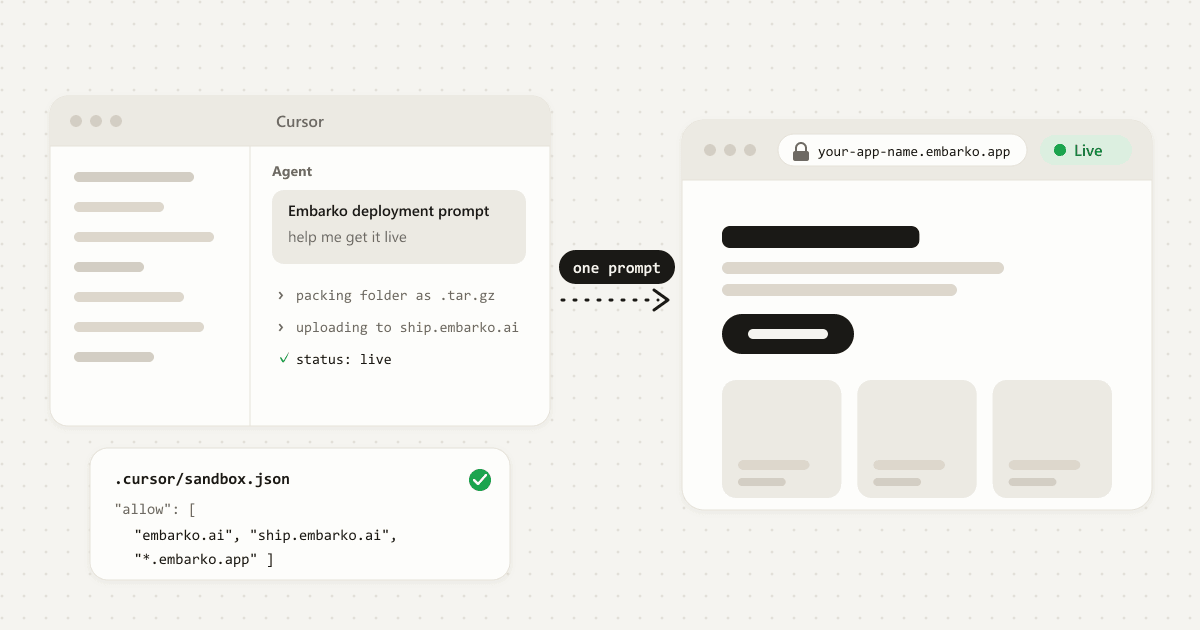
localhost only opens on your own laptop. One prompt later, the same portfolio has a live link you can put on your resume. Scroll, and we'll take it the whole way.You can host a portfolio website for free on Embarko's Free plan, which lists unlimited static websites.
If you built your portfolio with an AI tool like Claude, Cursor, Codex or Replit, paste Embarko's deployment prompt into that same tool and ask it to deploy. Built it in Lovable or Bolt? Export it first and open it in one of those. You get a live HTTPS link at your-name to put on your resume and LinkedIn, with no GitHub repo and no build settings.
Key takeaways
- Hosting a portfolio means putting its files on a server that's always on, with a public address anyone can open.
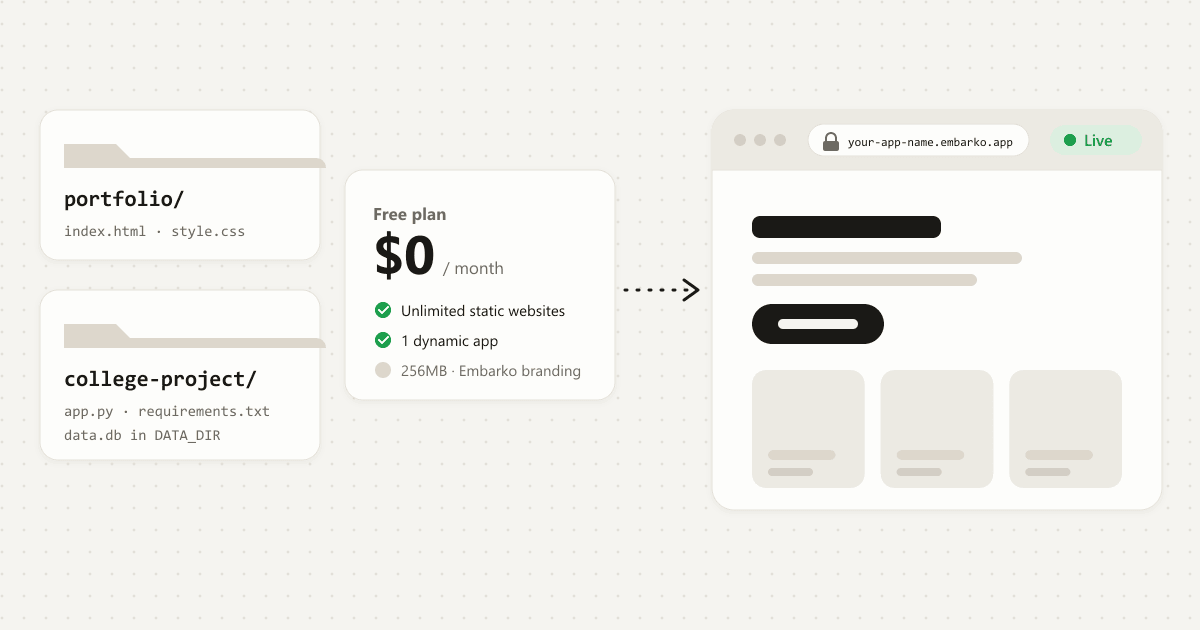
- A portfolio made of plain files, or a React or Vite site, is served as a static website. The Free plan on embarko.ai/pricing lists unlimited static websites at $0 a month.
- The AI tool that built your portfolio can also deploy it. You paste one prompt and get a link back.
- Updating it later works the same way: ask your AI to add the new project and redeploy under the same name.
- Once it's live, share the link where people look: your resume, LinkedIn, and the public Showcase gallery.
01 · Hosting
What it means to host a portfolio
While you build your portfolio, it runs on your own computer at an address like localhost:5173. "Localhost" just means "this computer", so that link only works for you. A recruiter clicking it gets an error.
Try it. Drag a link onto the recruiter's phone, or tap one:
Hosting fixes that. Your portfolio's files go onto a server, a computer that stays on all the time, and the server gives the site a public web address. Anyone with the link can open it, on any device, whether your laptop is on or off.
Most portfolios are static websites: pages made of HTML, CSS, JavaScript and images, with no code running on a server. That matters, because static sites are the easiest and cheapest thing to host.
02 · Your options
Where you can host a portfolio for free
There are three common routes, and each suits a different kind of person:
-
Portfolio builders
You pick a template, drag in your work, and the builder hosts it.
Good for designers and photographers showing image galleries.
- Your work
- Pick a template
- Drag in your work
- Builder hosts it
- Builder's link
-
Git-based static hosting
You push your code to a Git repository, connect it to a host, and set the build settings.
Good for developers who already use Git every day.
- Your code
- Git repository
- Push your code
- Connect a host
- Build settings
- Live link
-
Ask your AI tool to deploy
The AI that wrote your portfolio uploads it with one prompt and returns the link.
Good for anyone who built their portfolio with an AI tool.
- Your code
- One prompt
- Live link
Three routes, each for a different kind of person. If your portfolio is code, the AI route has the fewest stops.
Builders host what you make inside the builder, not a site you already have. If your portfolio is code, written by you or by an AI, look at the last two.
Whichever route you pick, check four things before you commit:
-
Cost: is it free for a portfolio like yours, and does it stay free?
On EmbarkoThe Free plan is $0 a month and lists unlimited static websites.
-
Your link: do you get a clean, shareable address with HTTPS?
On EmbarkoA live HTTPS link at
your-name.embarko.app. -
Updates: how much work is it to add a new project?
On EmbarkoAsk your AI to add it and redeploy under the same name.
-
Your own domain: can you move to
yourname.comlater without starting over?On EmbarkoIncluded in the Creator plan; connecting it takes one DNS record.
03 · The fiddly part
Why hosting a portfolio gets fiddly
Hosting a site you built yourself sounds like one click. In practice, the usual route asks for a few things first:
A Git repository. You create an account, make a repository, and push your files to it. If you've never used Git, that's a new tool to learn before your portfolio goes anywhere.
Build settings. A React or Vite portfolio has to be built before it can be served. You choose a framework preset, a build command and an output folder, and a wrong guess gives you a blank page.
Broken paths. Images and links that worked on your computer can point to the wrong place once the site is online.
Updates. Every time you add a project, you repeat the commit, push and rebuild cycle.
None of that is hard once you know it. It's just a lot to learn when all you wanted was a link for an internship application.
04 · Side by side
The usual route compared with asking your AI
| Usual route (Git-based hosting) | Embarko (ask your AI) | |
|---|---|---|
| What you need first | A Git account and a repository | The AI tool you already used |
| Build settings | You pick the framework, build command and output folder | Embarko detects the project and builds it (deploy) |
| A plain HTML portfolio | Push the files, wait for the build | Published with no build, usually live within 2 seconds (static sites) |
| A React or Vite portfolio | Configure the build yourself | Send the project with its package.json; Embarko builds it and serves it as a website (deploy) |
| Adding a new project later | Commit, push, wait for the rebuild | Ask your AI to add it and redeploy under the same name (deploy) |
| Your link | Depends on the host | your-name.embarko.app |
Not sure your kind of portfolio fits? The answer, with a table, is in the FAQ: What kind of portfolio can you host for free?
05 · Five steps
How to host your portfolio for free, step by step
Five steps. Tap a number when you've done it. 0 of 5 done.
-
1. Open your portfolio in the AI tool that built it
Open the project in Claude, Cursor, Codex, Replit or whichever coding tool you used, and check it still runs on your computer. If you built it in a browser tool like Lovable or Bolt, export or download the project first and open it in one of those tools.
Where did you build it?
Pick one to see where to start.
You'll know it's ready when the site opens on your computer and looks the way you want recruiters to see it.
-
2. Copy the deployment prompt
Go to embarko.ai and press Copy deployment prompt. It starts like this:
deployment-prompt.txt The start of the prompt: deploy first, give the link, then ask for your email.Deploy this app to Embarko — cloud hosting for small apps. No Dockerfile, no signup. Read https://embarko.ai/docs/quickstart.md and follow it. Nothing to install. Deploy anonymously first — no token, no account — then give me the live URL. Only once it's live, ask me for my email: Embarko mails back a token that makes the app permanent.
Always copy the full prompt from the site, because it can change. You'll know you have it when your clipboard holds the whole prompt, including the line about the email token.
-
3. Paste it and ask for your portfolio
Paste the prompt into your AI tool and add one line with the name you'd like in your link, for example:
Your AI toolDeploy my portfolio to Embarko as jane-doe-portfolio and share the live linkYour tool asks before running commands or reaching the internet
Agent
Your app is live:
https://jane-doe-portfolio.embarko.app. It stays online until deletion time. Want me to keep it permanently?The agent deploys first and gives you the link. It only asks about keeping it once it's live. The agent packages your site, uploads it and waits until it's live. If your tool asks before running commands or reaching the internet, approve it. If you use Claude with the Embarko connector, it deploys through that instead and the site goes straight into your account.
You'll know it worked when the agent replies with a link (and, unless you used the Claude connector, the time it will be deleted if you don't keep it). If the name is taken, the agent picks a close one and tells you. If the build fails, it fixes the code and tries again.
-
4. Open your link
Open the link the agent gave you, something like
https://jane-doe-portfolio, on your phone as well as your laptop. Click every project and check the images load..embarko.app One link, two devices. The phone is the real test: it isn't your computer. You'll know it worked when the link opens on a device that isn't your computer.
We tried this on 19 October 2026 with a one-page HTML portfolio: Embarko replied that it was live in under 1 second, and the link opened straight away.
-
5. Keep it online
Used the Claude connector? Skip this step: the site is already yours. Otherwise, say yes when the agent offers to keep it, give your email, and paste the token Embarko mails you; your portfolio then stays at the same link (keep an app). A site you don't keep is deleted 24 hours after its first deploy, so do this before you send the link to anyone.
Your app is live:
https://jane-doe-portfolio.embarko.app. It stays online until deletion time. Want me to keep it permanently?
localhost:5173jane-doe-portfolio.embarko.appOnly on your laptop
Finish the five steps and your portfolio gets a link for your resume.
Stuck at any step? A blank page, a missing image, an old version or a link that stopped working each have a quick fix.
Open the common snags06 · Updates
How to update your portfolio later
A portfolio is never finished. When you build something new, open the same AI tool and ask:
Add my new project to my portfolio and redeploy it to Embarko as the same app
Redeploying under the same name updates the same site at the same link (deploy). Your agent usually saves the token from step 5 so it can update the site later. On a new computer or in a new tool, give the agent your email again: Embarko mails a new token, and your old ones keep working (keep an app).
07 · Get seen
How to get your portfolio seen
A link nobody clicks doesn't help. Put it where people already look:
Your resume and LinkedIn. Add the link to your contact line and to the Featured section of your LinkedIn profile.
A title, description and favicon. Ask your AI to give every page a clear title and short description and to add a small site icon (favicon), so your link shows a proper preview when you share it.
Showcase. Embarko's Showcase is a public gallery of apps built with AI. Once your site is kept, ask your agent to list it under the Personal category (list it on Showcase). If you deployed with the Claude connector, submit it yourself at embarko.ai/app/showcase/submit.
Your own domain. A name like
yourname.comis easier to remember. It's included in the Creator plan (pricing), and connecting it takes one DNS record (own domain).
08 · Questions
FAQ
What does it mean to host a portfolio website?
It means putting your portfolio's files on a server that's always on, so the site has a public web address. Until then, it only runs on your own computer and nobody else can open it. Once it's hosted, it gets a link like your-name.embarko.app that works on any phone or laptop.
Where can I host my portfolio website for free?
Portfolio builders, Git-based static hosts and Embarko all have free options. If you built your portfolio with an AI tool, you can ask that tool to deploy it to Embarko, whose Free plan lists unlimited static websites at $0 a month (pricing).
What kind of portfolio can you host for free?
Plain HTML, CSS and JavaScript, React, Vite, a Lovable or Bolt export, and Next.js all work. A contact form that sends emails and large videos need another route for that part.
| Your portfolio | Does it work? | Notes |
|---|---|---|
| Plain HTML, CSS and JavaScript | Yes | A static website, published as it is |
| React, Vite or a Lovable or Bolt export | Yes | Sent with its package.json; Embarko builds it and serves it as a website (deploy) |
| Next.js | Yes | It runs as a server app (deploy). The Free plan lists 1 dynamic app (pricing) |
| A contact form that sends emails | Another route for that part | A static site has no server code. Ask your AI to use a form service, or deploy the portfolio again as a server app under a new name (static sites) |
| Large videos | Another route for that part | Images are fine to send. Media over about 5MB each should live on an outside host and be embedded (deploy) |
Is it really free?
Yes. The Free plan is $0 a month and lists unlimited static websites (pricing). The first deploy is temporary until you keep it with your email (connector deploys are kept from the start), and keeping it costs nothing (keep an app). Because the plan lists unlimited static websites, you can keep more than one portfolio or project site.
Do I need to know how to code?
No. The AI tool that built your portfolio also deploys it. You copy one prompt from embarko.ai, paste it into that tool, approve it if it asks to reach the internet, and open the link it gives you. If something looks wrong, describe it and the AI fixes the code and redeploys.
Do I need GitHub to host my portfolio?
No. Your AI tool uploads the files straight to Embarko, so you don't need a repository. If you keep your code on GitHub anyway, that's fine; it's just not part of hosting here. When you add a project later, you ask your AI again and it redeploys, with no commits or pushes. See deploy an app without GitHub.
Can I host a React portfolio for free?
Yes. Ask your AI to send the project with its package.json and build script, not a built dist folder. Embarko builds it and serves it the same way as a static website, and links to inner pages still load (deploy, static sites).
Can I use my own domain for my portfolio?
Yes, with the Creator plan ($9 a month, billed yearly). Your site gets your-name.embarko.app free straight away, and connecting your own domain takes one DNS record (own domain). HTTPS is set up for you automatically once the record is in place.
How do I update my portfolio after it's online?
Open the AI tool you used, ask it to make the change, and tell it to redeploy to Embarko under the same app name. The same link then shows the new version, so the address on your resume and LinkedIn never changes (deploy).
Will my portfolio show up on Google?
Hosting makes it reachable. Google finds new sites over time, faster when other pages link to yours, so share the link on LinkedIn, your resume and Showcase. A clear title and description on every page also help Google show it properly.
Only opens on your laptop
Your turn
Built something with AI? Ask it to deploy to Embarko.
Copy the deployment prompt from embarko.ai, paste it into the tool that built your portfolio, and get a link you can share today. Students can also read free hosting for students. Built your site in a specific tool? See host a website built with Claude, deploy from Cursor or deploy a Replit app for free.
- Copy the prompt
- Paste it into your AI tool
- Put the link on your resume
Keep reading: Free hosting for students · Deploy an app without GitHub · Static sites docs · Pricing